
✦ All Features / Document Translation Portal
AI document translation you’ll love to use
Automatically translate books, articles, newsletters, reports, and more into 80+ languages. Spf.io helps you move faster and produce better results—whether you’re translating on your own or managing documents across languages and teams.





Start translating instantly
Skip the learning curve and get started easily with spf.io’s AI document translation tool. Upload your document, get instant translations in multiple languages, and preserve your original formatting.

Enjoy a rewarding translation experience
Spf.io enhances your workflow with an easy-to-use document editor, context-aware AI suggestions, and vocabulary fine-tuning tools. Experience the delight of doing your best work, faster.

Manage multilingual documents at scale
Easily view, manage, and review translation documents across languages—all in one place. Track progress, ensure consistency, and collaborate seamlessly with your team.
Get instant document translation
in 80+ languages
Automatically translate documents in seconds—no complicated setup required. Get the job done fast, whether you’re working solo or with a team.
Translate documents in various formats: Import Word documents, .docx, .txt, .md, and .json (i18n) files, or copy and paste text directly into the editor. Slide translation (PPTX or PDF) and subtitles translation are also available.
Keep formatting intact: Spf.io keeps sentences and paragraphs between translations aligned, so you can focus on translation instead of formatting. Translations can reproduce the styling of source Word documents, including keeping images!
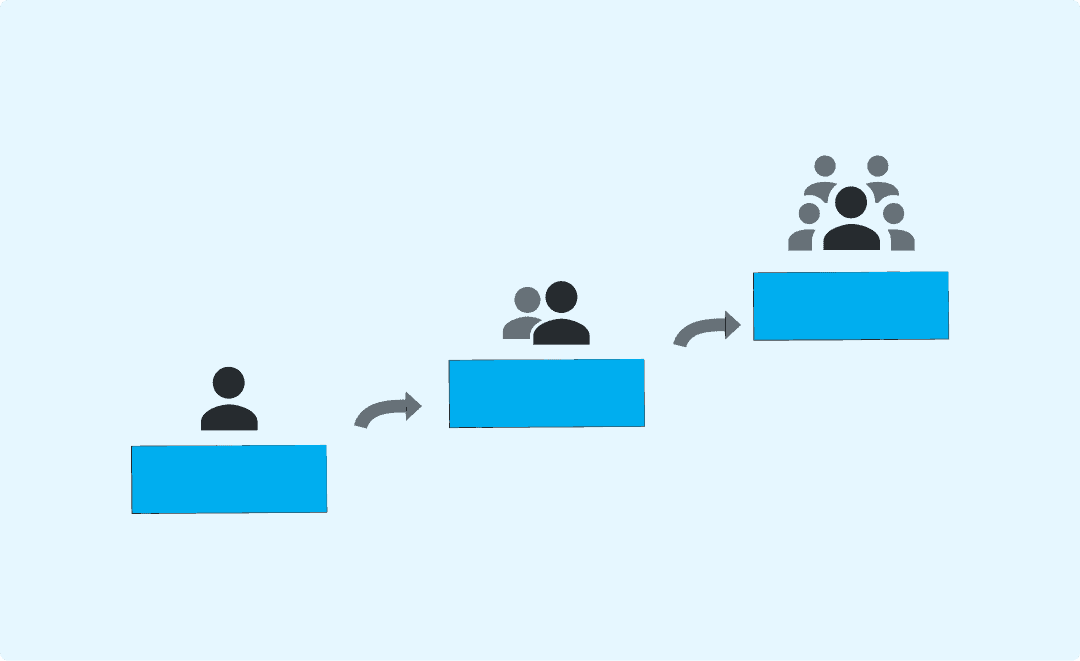
Grows with you: Get quick translations today and scale up when you’re ready—bring in your own translators or let spf.io provide a human in the loop when needed.
Translate documents in various formats: Import Word documents, .docx, .txt, .md, and .json (i18n) files, or copy and paste text directly into the editor. Slide translation (PPTX or PDF) and subtitles translation are also available.
Keep formatting intact: Spf.io keeps sentences and paragraphs between translations aligned, so you can focus on translation instead of formatting. Translations can reproduce the styling of source Word documents, including keeping images!
Grows with you: Get quick translations today and scale up when you’re ready—bring in your own translators or let spf.io provide a human in the loop when needed.
“The translation results are very helpful for translators so they don’t have to translate from scratch.”
Maria Fennita
Editorial Director at Christianity Today Indonesia
Your creative partner in translation
Instead of replacing you, spf.io’s AI works with you—offering smart suggestions that spark ideas and help you craft translations you’re proud of. Whether you’re stuck on a phrase or refining a full paragraph, it’s like having a creative partner by your side.
Easy-to-use document editor: Quickly review and edit your translated documents with a simple, intuitive editor—whether you need an automatic translation or want to refine it for better quality.

Context-aware AI suggestions: Explore alternative translations for a particular line and select the most precise translation that better fits your context and style.
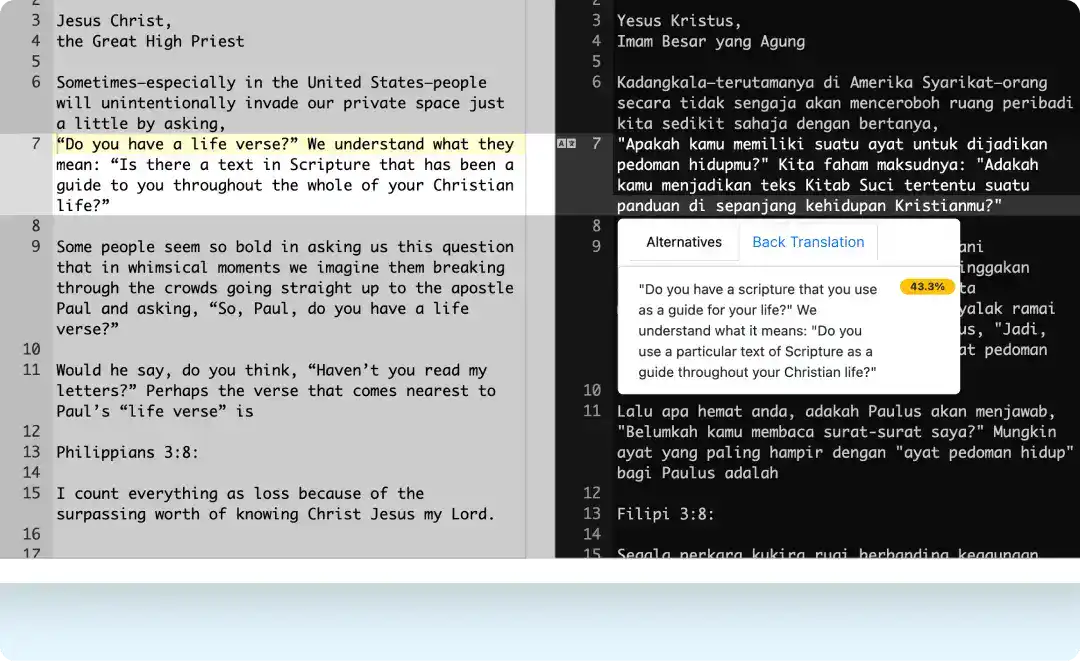
Back translation: Verify if a translation retains a similar meaning to the source document.
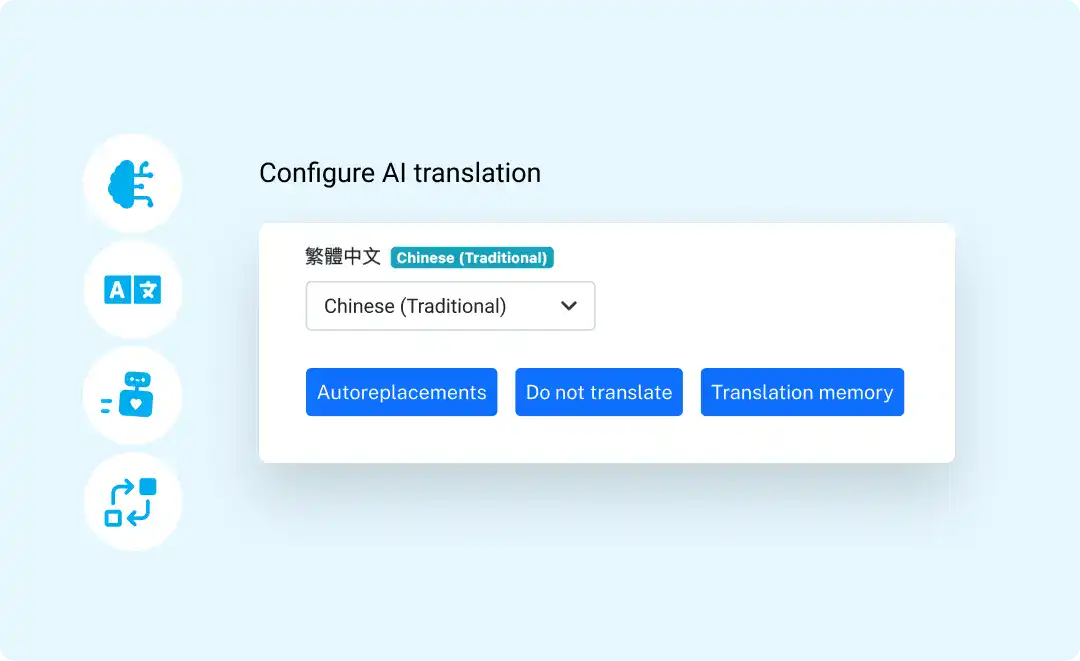
Vocabulary fine-tuning: Fine-tune spf.io’s language AI to your vocabulary. Ensure specific names, brands, or phrases appear correctly and consistently in your translations.
Easy-to-use document editor: Quickly review and edit your translated documents with a simple, intuitive editor—whether you need an automatic translation or want to refine it for better quality.
Context-aware AI suggestions: Explore alternative translations for a particular line and select the most precise translation that better fits your context and style.
Back translation: Verify if a translation retains a similar meaning to the source document.
Vocabulary fine-tuning: Fine-tune spf.io’s language AI to your vocabulary. Ensure specific names, brands, or phrases appear correctly and consistently in your translations.
“The alternative translation has become my favorite…[it] really helped me out to get what I actually want to achieve…I’m not double-questioning myself anymore because I have options to do something that gives me much more confidence.”
Marcel Vroegop
Geloofstoerusting
Coordinate translation projects
across teams & languages
Keep oversight of every project without juggling multiple emails or scattered files. Assign tasks, track progress, and ensure high-quality translations across your entire team—all in one place.

Translation dashboard: Get a clear overview of all your translation projects grouped by language. Organize documents into playlists and monitor post-editing progress across every document and language in one place.
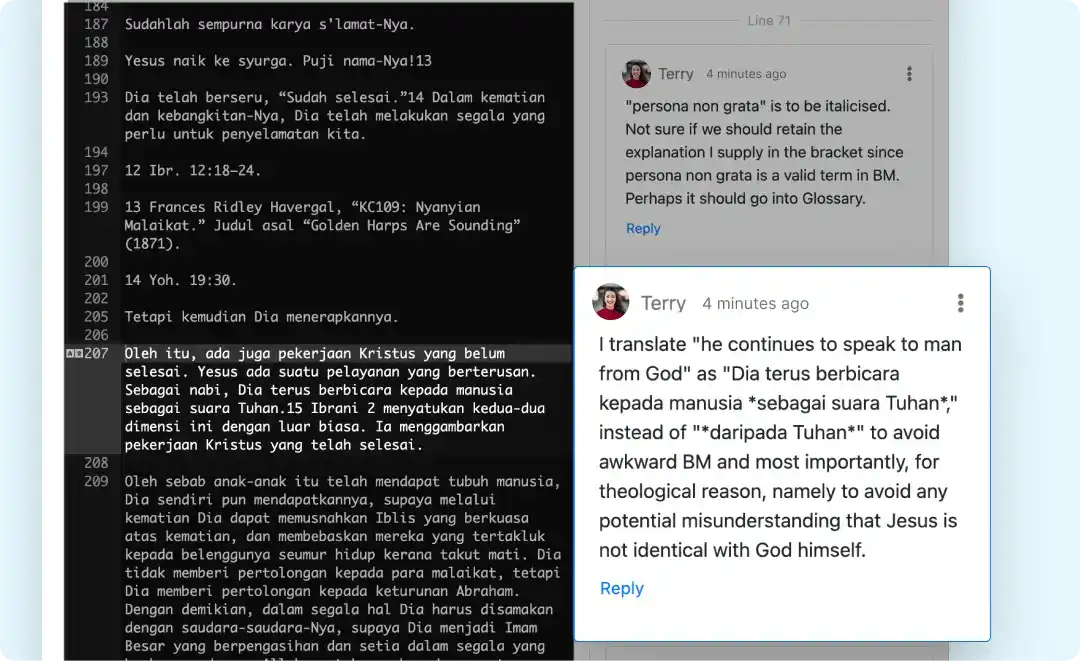
Collaboration tool: Simplify collaboration by leaving comments or feedback directly on specific lines in the translation.
Quality assurance tool: Compare automatic translation and human post-edited results to see every correction your translators make. See the automatic translation improve over time.
Translation dashboard: Get a clear overview of all your translation projects grouped by language. Organize documents into playlists and monitor post-editing progress across every document and language in one place.
Collaboration tool: Simplify collaboration by leaving comments or feedback directly on specific lines in the translation.
Quality assurance tool: Compare automatic translation and human post-edited results to see every correction your translators make. See the automatic translation improve over time.
“File management became complicated because we were doing it on a Google Drive…So [spf.io’s] file management of the playlist is very helpful. The separation of projects is done naturally…You can just see from the articles, how they are [grouped] in a playlist…As the person is reviewing, you can see a status bar on how many lines that person has already reviewed.”
Massimo Gei
Greenhouse Publishing
Tailor the machine translation to your specific domain
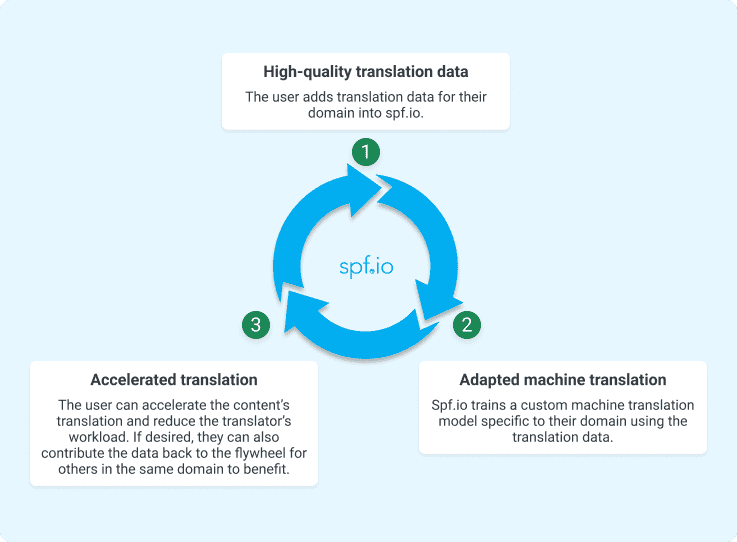
Spf.io leverages your translation data to train a custom AI model that imitates your translator’s style and corrections stored in the translation memory. This approach produces nuanced translations for domain-specific content (medicine, theology, politics, economics, etc.) while saving time and effort for your translation team.

1
The user adds translation data for their domain into spf.io.
2
Spf.io trains a custom machine translation model specific to their domain using the translation data.
3
The user can accelerate the content’s translation and reduce the translator’s workload. If desired, they can also contribute the data back to the flywheel for others in the same domain to benefit.
How to translate your documents
1
Upload and translate and your document into the target language.
2
Review and edit the translations with your team members. Easily track your team’s progress all in one place.
3
Export your document. If you want to use your document for a live event, add it to a playlist or directly to the session.
Enhance your translation projects with professional services
Instructor-Led Training
Get expert guidance and hands-on coaching to equip your team for bigger translation projects.
Translation Data Import
Request assistance from our team if you need help importing existing works or translation memories.
Translation Services
Request one of our human translators to review and refine your translation documents.
Contact us to request one of our services above or see the full list of services we offer.
Frequently Asked Questions
What makes spf.io’s Document Translation Portal (DTP) different from Google Translate and other free translation tools?
Spf.io’s Document Translation Portal (DTP) stands out from free translation tools like Google Translate in several key ways:
Context-aware translation
Unlike Google Translate, which often translates text in isolated chunks, DTP uses an AI-powered algorithm to process your documents line by line. By adding a Large Language Model (LLM) integration, you can get context-aware translations based on the previous three lines that have been translated. This approach allows the AI to generate alternative translations that are more consistent with the preceding text and better fit the overall flow and context. You can also utilize custom prompts to refine the instructions given to the AI based on your desired style or output. These custom prompts can be saved and reused within spf.io.
Customizable translations
DTP allows you to review and edit translations. Any changes or corrections you make are added to your autoreplacements database. This means DTP will automatically apply your corrections to the rest of your document and future translations, saving you time and effort. You can also build a glossary to ensure certain words or phrases are never translated or always translated in a specific way.
Domain-specific adaptation
While free tools like Google Translate provide generic translations, DTP adapts to your unique terminology and style. The more you use it, the more it aligns with your specific domain or content, resulting in higher-quality translations.
Efficiency for professional use
DTP is suitable for professionals who need consistent, high-quality translations. Spf.io has a simple interface, which makes it easy for any of your team members to learn how to use it right away. The language filters enable your translators to focus on the content in their language. When post-editing the translation, you can preview the source document to understand the context better. You can work with your team to manage, review, and edit translation documents all in one place. It’s also possible to integrate DTP with your project management platforms like Asana, Airtable, etc.
What languages does spf.io support?
We support over 80 languages for document translation:
|
Albanian |
Galician German Greek Gujarati Haitian Creole Hawaiian Hebrew Hindi Hmong Hungarian Icelandic Indonesian IsiZulu Italian Japanese Javanese Kazakh Khmer Kinyarwanda |
Korean |
Romanian |
How many of my team members can access DTP?
Spf.io is priced on usage levels rather than per user. This means you can invite as many collaborators as you need to post-edit your translation documents.
We built it this way because we believe in community-sourced translation. Many organizations need to make their content available in many languages. To make that affordable, we empower communities with the tools they need to distribute the work among their own staff, volunteers, and members.
Your coordinator or team leader can see an overview of the translation projects and easily track the team’s post-editing progress in the dashboard.
These collaborative features save a lot of time and effort and make delegating work throughout your community a joy rather than a pain.
How do I collaborate with my team members and track their translation progress?
The comment feature allows your editors and translators to leave feedback directly on specific lines in the translation. This eliminates the need to juggle multiple files and emails. Comments can be exported within the Word document, which is helpful for people who prefer to review on paper or are experiencing screen fatigue.
You can organize your documents by adding them to a playlist. In the playlist, you can see the status bar (in blue, yellow, or green) of the post-editing progress for each language assigned to your team members. The green status bar will indicate that the post-editing is done once they select ‘All lines reviewed’ and save the changes in the document editor.
How can I deliver my scripts as captions and translations during a live event?
You simply add your manuscripts, whether pre-translated or translated in spf.io, to a playlist and assign it to your session. Then, during your live event, you can release the translation line by line, ensuring perfect synchronization with your speaker or presentation. This provides a seamless experience for your audience, allowing everyone to follow along in their preferred language.
How do I get started?
Fill out the Request a Demo & Quote form to schedule a discovery call. We’ll help you find the right solution through a needs assessment and tailor the features to your needs.
Reach a wider audience with your multilingual content
Go beyond AI document translation. Explore what other spf.io tools can do to elevate your multilingual content further in one platform.

Automatic Captions & Translation
Deliver real-time captions and translations of live and pre-recorded speech in 100+ languages to the audience via big screens, mobile devices, or embedded on your website.

Audio Live Streaming
Stream audio interpretation and assistive listening directly to mobile devices without extra equipment. Supports remote simultaneous interpretation.

Multilingual Polls
Automatically translate questions and motions into many languages. Increase your audience’s engagement and empower them to vote in their own language through mobile devices–in person, virtual, or hybrid.

Audio Video Captions & Subtitles
Automatically generate captions, subtitles, and transcription to any audio and video recordings. Easily edit them to perfection and export the results into multiple formats.

Slide Translation
Automatically translate slides into multiple languages and edit them as needed. Easily show translated slides on big screens and distribute them to people’s mobile devices.
Multilingual Conversations
Facilitate seamless conversations and collaborations in many languages during your event. Let people speak in their native languages through real-time captions and translation–online and in person.