
✦ All Features / Multilingual Conversations
AI-powered multilingual conversation tool
Spf.io Convo lets everyone speak their native language and feel like they belong. Make friends, build relationships, and collaborate with people in 40+ languages, online and in person.


Start your conversation with ease
Spf.io Convo’s setup process is quick and easy, so you can spend more time engaging with your people and less time fussing with technical details.

Converse anytime, anywhere
Bring spf.io Convo with you anywhere you have an internet connection. It’s compatible with multiple devices and ready to support in-person, online, or hybrid conversations.

Customize your AI
Enhance the accuracy and quality of the captions and translations by shaping spf.io’s language AI to your unique needs.
Facilitate seamless conversations
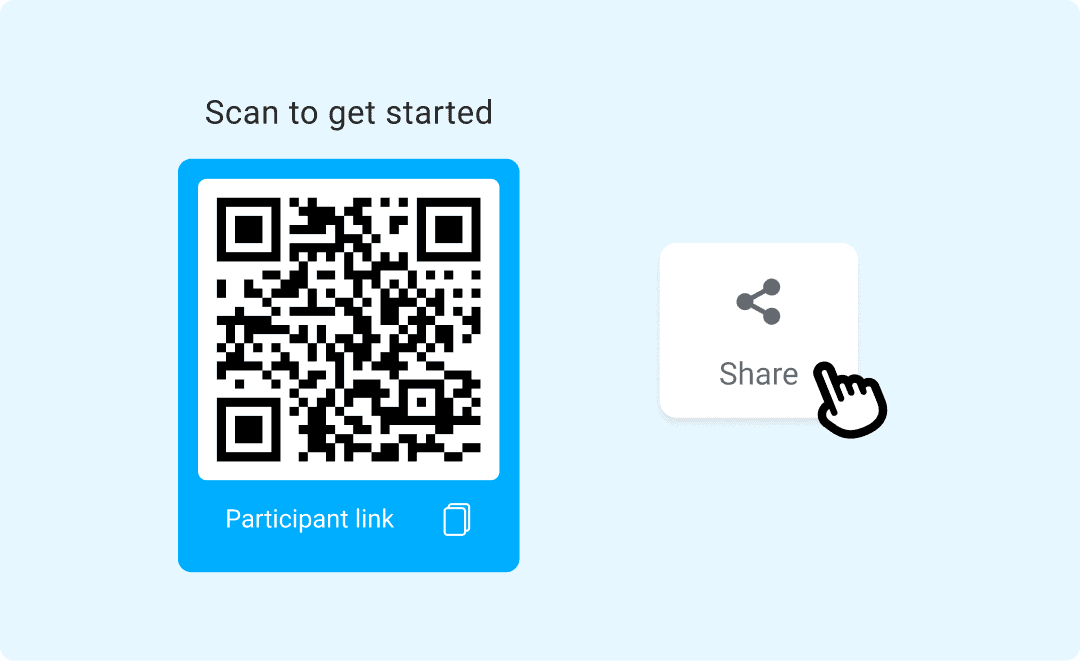
Easy access: Your audience can easily communicate and access translations on their mobile devices via a QR code or URL without downloading an app.
Converse in real time: Spf.io Convo automatically translates conversations in only a few seconds. Everyone can communicate smoothly in their preferred language and feel included and valued.
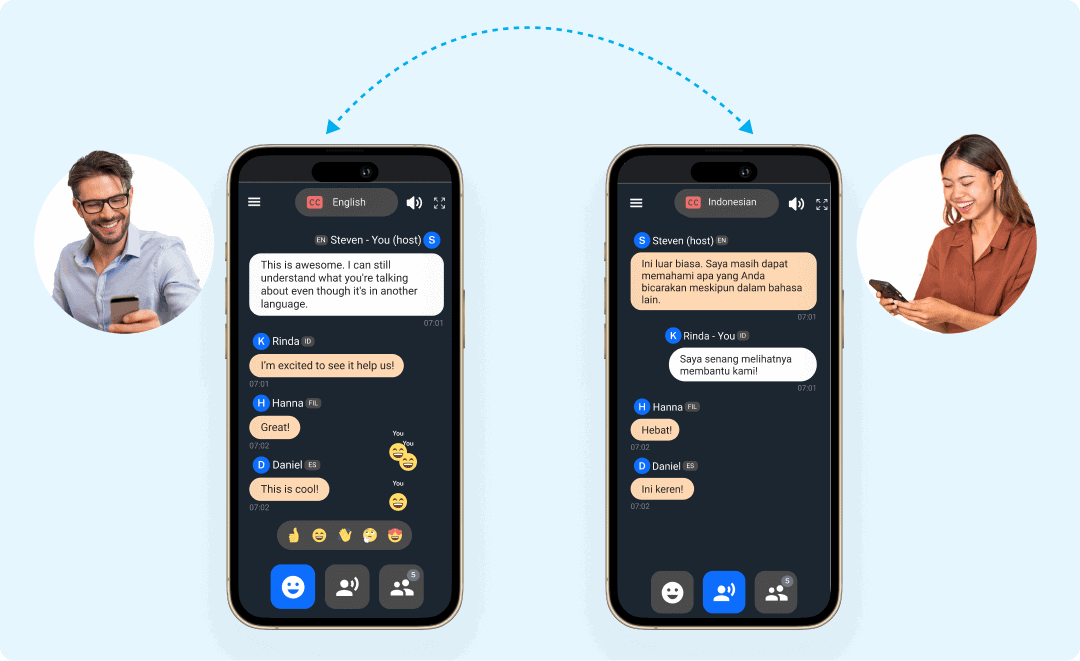

Easily connect with people wherever you are
Build personal relationships: Talk with neighbors, network at conferences, make friends while traveling, and strengthen relationships across languages, cultures and generations.
Support team collaboration: Spf.io Convo speeds up communication in different languages, empowering your global team to collaborate more efficiently and achieve your goals.
Achieve higher-quality results with custom AI
AI safety: Our built-in profanity filters are customizable with your own entries to reduce the risk of harm. Prevent inappropriate content from being released in real time.
Vocabulary fine-tuning: Keyword boosting, autoreplacements, and Do Not Translate enable you to fine-tune spf.io’s speech recognition and translation to your vocabulary.

Use with your existing platforms
Use spf.io Convo side by side with multiple online meeting platforms like Zoom and Google Meet for a seamless multilingual conversation experience. You can also use it on your phone.

How it works

1
Create a session and select the languages that will be used.
2
Share the session URL or QR code with your participants and start the conversation.
3
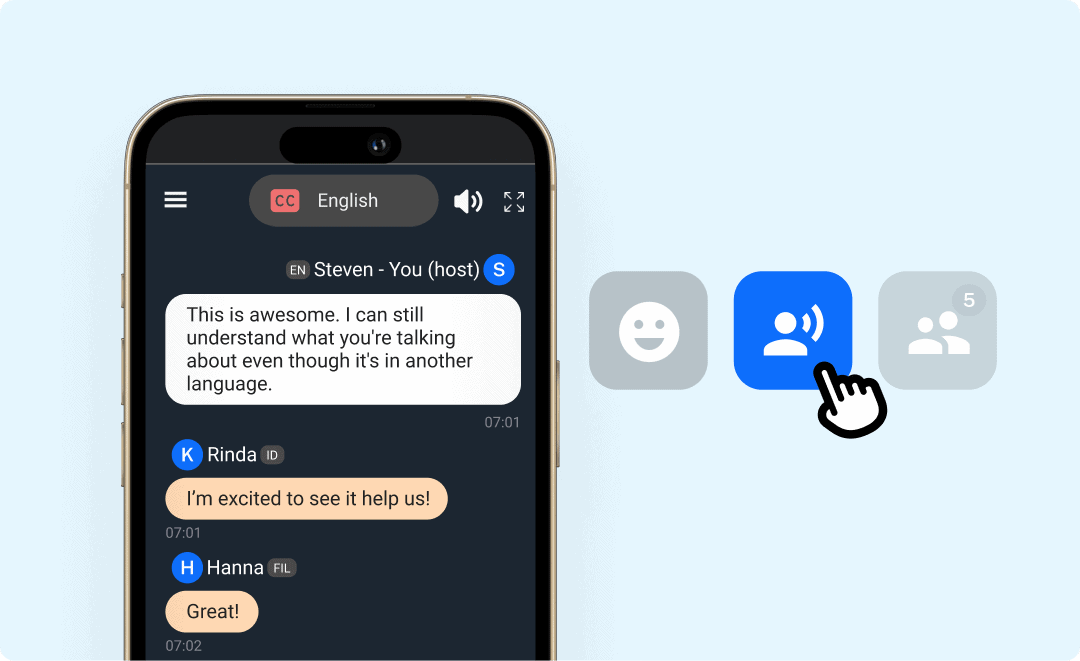
The participants can converse with each other by clicking the Talk button to activate and mute the microphone. They will then receive a translation in their chosen language in real time.
Make the most of every conversation
Leverage spf.io Convo’s features to run successful multilingual conversations with ease.
Push-to-Talk
Get faster and easier control of when your microphone is activated and silenced with a click of a button.
Cloud Text-to-Speech
Enable your participants to listen to AI translation while they read captions and translation during the conversation.
Noise Reduction
Adjust the Reduce Noise setting so the captioner only captions your voice and ignores other noises. The clearer your voice is, the more accurate the captions it produces.
Session Transcript
Download the conversation transcript in your selected languages to share with your team members or participants.
Frequently Asked Questions
Where can I use spf.io Convo?
You can use spf.io Convo for two-way conversations or more—in-person, online, or hybrid. It’s useful for team meetings, roundtable discussions, parent-teacher conferences, Bible studies, 1:1s, and more.
What languages does spf.io support for AI-powered multilingual conversations?
Spf.io supports 40+ languages for real-time multilingual conversations and discussions. View the complete language matrix on the Supported Languages page.
Why does my microphone not work?
You may have missed a pop-up when spf.io asked for access to your microphone. You can go to your browser settings and allow spf.io to access your microphone.
You can also change which microphone is being used by spf.io Convo by clicking on the menu in the app and changing the microphone input under Microphone Settings.
Can participants change their language during the conversation?
Yes, participants can select or switch languages at any time during the conversation. This ensures flexibility as discussions evolve.
How do I get started?
Fill out the Request a Demo & Quote form to schedule a discovery call. We’ll help you find the right solution through a needs assessment and tailor the features to your needs.
Maximize your event’s impact
Go beyond AI-powered multilingual conversations. Explore what other spf.io tools can do to elevate your multilingual events further in one platform.

Automatic Captions & Translation
Deliver real-time captions and translations of live and pre-recorded speech in 100+ languages to the audience via big screens, mobile devices, or embedded on your website.

Audio Live Streaming
Stream audio interpretation and assistive listening directly to mobile devices without extra equipment. Supports remote simultaneous interpretation.

Multilingual Polls
Automatically translate questions and motions into many languages. Increase your audience’s engagement and empower them to vote in their own language through mobile devices–in person, virtual, or hybrid.

Audio Video Captions & Subtitles
Automatically generate captions, subtitles, and transcription to any audio and video recordings. Easily edit them to perfection and export the results into multiple formats.

Document Translation Portal
Quickly translate any documents needed for your event with higher accuracy. Easily manage multiple translations and track your team’s progress.

Slides Translation
Automatically translate slides into multiple languages and edit them as needed. Easily show translated slides on big screens and distribute them to people’s mobile devices.